Overview
Disclaimer: this is purely an educational project.
I wanted to see how far scalpers currently push ethical and legal boundaries to line their pockets. I built a Pokémon card stock checker that can query Target's inventory by ZIP code (using specific SKUs) and send useful, concise Discord alerts. I stopped just shy of automated polling, because the next step wasn't fun. It was going to take a lot of work figuring out how to circumvent and evade anti-bot measures across the different vendors.
Almost all online storefronts have some kind of anti scraping measures in place. The vendors I tried (Walgreens, Target, Walmart, GameStop, and Dollar General) had either Cloudflare, rate limits, CAPTCHA triggers, behavior detection mechanisms, or device fingerprinting to outright block suspected bad actors. Getting a bot to run against any of these in a reliable state would require running code on a VPS with Selenium or Playwright in order to imitate real browser sessions. Thats in addition to rotating residential proxy IPs, managing cookies, and handling JS challenges. That's a lot of overhead for my little research project, and honestly not where I wanted to spend my time. Target however, had an internal API that their own website used, and it was very friendly to reverse engineer and work with.
How Target's Inventory API Works
Target's internal API, redsky.target.com is pretty cool. Every time you load a product page, your browser hits these endpoints in the background. The API requires a "key" query parameter, but it is not a developer token. It behaves like an app-level value used by Target's frontend and appears in page HTML as a Next.js "buildId". That value rotates each time Target deploys a new build. Extracting it was tricky to figure out at first but strangely straightforward using a bit of regex to pinpoint the buildId:
resp = await http.get("https://www.target.com", headers={"User-Agent": ...})
                        m = re.search(r'"buildId"\s*:\s*"([0-9a-f]{40})', resp.text)
                        new_key = m.group(1)
When my bot starts up or gets a 403 for Target, it loads target.com, regexes out the key, and stores it off locally. If the request key parameter changes, the key rotates and the bot picks it up on the next retry.
Browser Impersonation
Target's API doesn't serve responses to httpx clients. The requests need to look like they came from a real browser, and I chose to emulate Chrome on Windows (just easy to do, not for any actual reason). That means spoofing a full set of headers:
TARGET_HEADERS = {
                "User-Agent": "Mozilla/5.0 (Windows NT 10.0; Win64; x64) ... Chrome/124.0.0.0 Safari/537.36",
                "sec-ch-ua": '"Chromium";v="124", "Google Chrome";v="124"...',
                "sec-ch-ua-platform": '"Windows"',
                "Sec-Fetch-Dest": "empty",
                "Sec-Fetch-Mode": "cors",
                "Sec-Fetch-Site": "same-site",
                "Referer": "https://www.target.com/",
                "Origin": "https://www.target.com",
            }
The Sec-Fetch-* and sec-ch-ua headers are important, and missing them is a quick
way to get blocked. Matching Referer to request context (search page for search endpoints, locator page for
store lookup endpoints) usually improves consistency and reduces risk of soft blocking.
Finding Stores and Products
I ended up creating two ways to run stock checks in Discord:
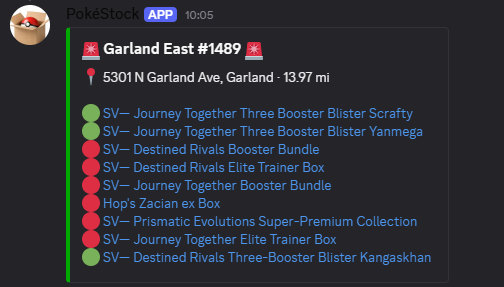
/searchcommand basically mimics search on the website, returning the top 5 results for a given query and checks stock for those 5 items at all nearby stores./stockallcommand checks a static watchlist for the inventory status of many items in those same nearby stores. The watchlist is just a json file with a number of hard coded TCINs (Target.com Item Numbers) that made it incredibly fast to check a whole set of products at once without needing to do individual lookups every time.
In order to not get ourselves soft blocked from the API, the bot finds stores in the provided ZIP code and caches that list in a 'locked' state for a short time. This way, searches in short succession can reuse the same store list without hitting the API with unneeded lookups. The same goes for products, it keeps a local list with readable item names mapped to internal IDs. If your search matches any recently queried ZIP codes or item names, it returns results immediately from the local cache. If not, it does a live lookup and maps the updated result to the correct internal product ID.
Once the bot has stores and products the bot can check stock across each location in parallel, with guardrails to avoid sending too many requests at once. It then reports whether each store has it in stock, has limited stock, is out of stock, or does not carry that item, along with the quantity when available
Discord Output
Results are formatted into Discord embeds; an embed per product listing the local stores and availability for /search, and an
embed per store for /stockall showing the list of products and their availability. These are batched as to not exceed
the 10 embed Discord limit or the 6000 character limit. In-stock stores get a red embed with "🚨" markers so
they stand out.
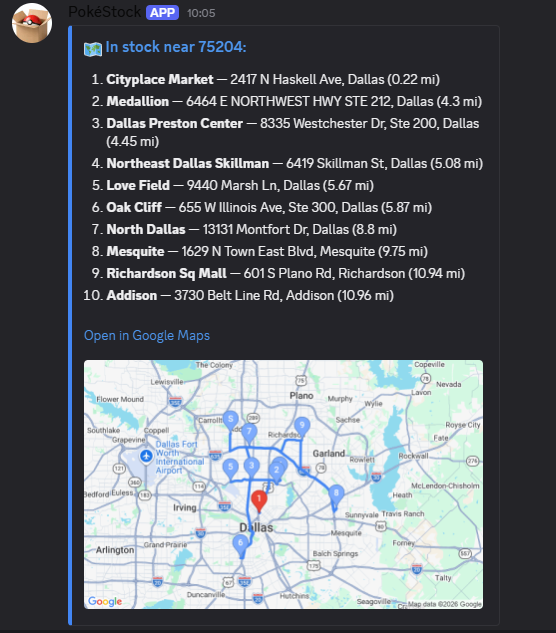
If any stores have stock, the bot also hits the Google Maps API to generate a maps route embed with
all the in-stock locations provided in a travel optimized order, along with a static map image pulled from the Maps API. When
the user opens the route embed, they see the best route to hit all the in-stock stores, and maps prepends the users own location as the starting point
(Honestly this was so unnecessary but I love working with the Maps API).
What I Left Out
Costs added up faster than expected. The APIs I hit were free, but I still needed somewhere to host the bot and a residential proxy list to rotate through. On top of that the affordable proxy lists are basically useless for projects like this at scale. That put me at about $7 a month (bare minimum) before anything else. Datacenter IPs get flagged almost immediately, and the entry-level residential ones aren't much better at scale. To do this reliably for multiple stores you would need a premium rotating residential proxy pool, which can be incredibly expensive. The next steps were to spin up a VPS, start running headless browsers, track proxy burn rate in that premium pool, build out a captcha solver, beat cloudflare, and deal with every storefront's unique anti-bot measures.
It was fun to see how these systems work. They obviously aren't impervious (just takes time and effort), but they certainly keep out Joe Shmoe well enough. It's unfortunate that there are so many individuals who are willing to purchase access to scalping tools, and even more unfortunate that people go through the effort to develop and keep those tools up to date.
Try it for yourself
Simplified methodology to pull and test the Target RedSky API key is here: redsky-key-retrieval GitHub Repository.
The main stock checking bot repository is here: pokestock-bot GitHub Repository. To make it work with your own setup, update the following:
- Copy
.env.exampleto your own.envand modify as needed. - Add a
BOT_TOKEN(required) for your Discord bot to work. If you want it hosted, I'm shamelessly plugging SparkedHost who have always been affordable and reliable for me. - Optional but recommended restrictions:
ALLOWED_USERS,ALLOWED_CHANNEL_ID, andGUILD_ID(faster slash-command sync while testing). - If you want map image embeds, add
GOOGLE_MAPS_API_KEY. - If you run into Target rate limits/captcha issues, configure
WEBSHARE_PROXY_URLand/or a fixedTARGET_API_KEY. - Customize the watchlist by editing
WATCHED_TCINSandTCIN_NAMESinutils/target_inventory.py. - Install dependencies from
requirements.txtand run withpython bot.py(Python 3.10+).